July 17, 2013
Looking for Photographs
June 21, 2011
Playing Around
Saw this reflection of two ladies and their bikes in window. Tried all sorts of things—multiple exposures, long shutter speeds, out-of-focus, and so on. Really did not like any of the photos that I took, but learned something valuable—I need to play around more with my camera. October 8, 2009
Graphic Forms

Whereas yesterday’s photo was about the color, today’s image is about the graphic form I saw as I looked at the dock and water. When I looked at the scene I saw three things—the graphic lines of the dock and water, the smoothness of the water and the roughness of the dock and the shapes.
I wanted the photo to show only the things that I “saw” before taking the image.
Enjoy.
Camera settings: Nikon D3, Nikon 70-200mm f/2.8 at 200mm, shot at ISO 200, f/13 and 1/90th
Post Processing:
Lightroom—Set white and black points, added mid-tone contrast, added clarity and increased saturation of blue.
Photoshop—used Topaz Adjust to bring out details in the dock and the reflection.
June 17, 2009
Abstract Forms #5

Today’s image is a three shot multiple exposure image of a man walking along a fountain. I wanted this photo to be all about the forms of the building and the man walking.
Enjoy.
Camera settings: Nikon D3, Nikon 70-200mm f/2.8, shot at ISO 200, 70mm, f/5.6 and 1/30th of a seconds.
Post Processing in Lightroom—Set white and black points, added mid-tone contrast.
June 16, 2009
Abstract Forms #4

Today’s image is a three shot multiple exposure image of the reflection of a lady behind a chained-link fence. I moved the camera position slightly between each exposure.
Enjoy.
Camera settings: Nikon D3, Nikon 70-200mm f/2.8, shot at ISO 200, 200mm, f/4.8 and 1/60th of a second.
Post Processing in Lightroom—Set white and black points, added mid-tone contrast, increased saturation of red, orange and yellow.
June 15, 2009
Abstracted Forms #3

Today’s image is three multiple exposures shot of a couple at various zoom levels while the lady turned her away from me.
Enjoy.
Camera settings: Nikon D3, Nikon 70-200mm f/2.8, shot at ISO 200, three shots at varying zoom levels, f/22 and 1.5 seconds.
Post Processing in Lightroom—Set white and black points, added mid-tone contrast, increased saturation of red, orange and yellow.
June 12, 2009
Abstracted Forms #2

Today’s image is three multiple exposures: a couple setting on the bench, a bush of yellow flowers and two yellow flowers with their stem.
Enjoy.
Camera settings: Nikon D3, Nikon 70-200mm f/2.8, shot at ISO 200, three shots at varying zoom levels, f/22 and 1.5 seconds.
Post Processing in Lightroom—Set white and black points, added mid-tone contrast, increased saturation of yellow, red, and green.
June 11, 2009
Abstracted Forms #1
All the effects have been achieved totally in camera. I have not used Photoshop to combine photographs. All post processing of the images have been done only in Lightroom (or essentially, Camera RAW).
I have used slow shutter speeds, zooming while shutter is open and multiple exposures on same image to make these abstracts. Again, I wanted this to be all about trying new things to achieve movement and show colors in different ways.
Today’s shot is of a couple setting on a bench in Herman Park, which was taken while zooming my lens at a very slow shutter speed.
Enjoy.

Camera settings: Nikon D3, Nikon 70-200mm f/2.8, shot at ISO 200, zoomed during shutter opening from 70mm to 145mm, f/22 and 1.5 seconds.
Post Processing in Lightroom—Set white and black points, added mid-tone contrast, increased saturation of orange, green, blue and aqua.
April 30, 2009
Water, Light, Action

While in Fort Smith last week, I went down to the Arkansas River to see if I could get a few night photos. I tried lots of different things but nothing seemed to be working. So, I sat down on a bench and started watching the water flow. After watching a while, I decided to move towards the bridge where the lights were casting all sorts of patterns on the river below.
Again, I tried different things, but again, not much was happening. Finally, I settled on isolating totally on the lights reflecting off the moving water. I switched lens to my 70-200mm f/2.8 so that I could isolate and compress the scene. I also put a neutral density filter on the lens so that I could slow my shutter speed.
I wanted the photo to be about the colors and the patterns.
Enjoy.
Camera settings: Nikon D3, 70-200mm f/2.8 at 170mm, shot at ISO 200, f/16 and 8 second with a exposure combination of -1.0 EV and 4-stop neutral density filter on a tripod with white balance set to 7,800K to add more warmth to the lights.
Post Processing:
Lightroom—Set white and black points, added mid-tone contrast, clarity and vibrance.
January 28, 2009
An Abstracted Family

January 20, 2009
Houston Marathon #2

When you attend an event like the Houston Marathon, you must realize that there are some things that you will not have control over. An example: BIG HAIR. Now, I am a Texas; I love Texas ladies; and, I like their BIG HAIR. But, even big hair has it’s place. Here I am having a little trouble with getting my shot around another viewer of the race. Realize that you will be faced with situations like this and just deal with it.

Amy is 3½ years old. She is a true artist. She is the photographer that I aspire to be. Here, she is photographing her mother and aunt. She is constantly directing them—“a little closer”, “bigger smiles”, "keep your eyes open”, etc. After each shot, she looks at the back of her camera to see what she has. No fretting over camera setting, just total concentration on the results, and then the barking of new instructions to her models. I did not see any of her images, but I bet her images captured the moment better than most of mine.
Finally, here is another attempt I made at capturing my abstract runners. Enjoy.

January 19, 2009
Houston Marathon
So, why did I go to the Houston Marathon with my cameras in hand? Well, I had an idea--I know this is risky for me! I was over at a friend’s house a few weeks ago and I started looking at a couple of his Leroy Neiman paintings. I really like the way the painter had abstracted the athlete and since I have decided to try more abstracts in 2009, I thought that would try abstracting some runners at the Houston Marathon.
My idea was to place my camera at street level, use a wide lens and a slow shutter speed. I thought that I would get blurred runners and a sharp background (the buildings of the Houston skyline). I did not get exactly what I thought, but I though a couple of them were interesting. Here is one of my abstract runners. Hope you enjoy.
Camera settings: Nikon D700, 28-70 f/2.8 at 28mm, shot at ISO 1,600, f/8 and 1.5 a second with the camera resting on the street.
Post Processing: Lightroom—set white and black point, and added mid-tone contrast, added clarity and vibrance, increased saturation of reds, yellows and blues, cropped the photo to be a more panoramic crop
January 7, 2009
Abstract Wednesday
Why is today “Abstract Wednesday”? Because today is Wednesday and I am presenting an abstract photograph today.
Reason enough for me.
This photograph is a nine multiple-exposure shot. With many of the Nikon, you can select multiple exposures in the menu, dial the number of exposures you want and select exposure compensation and start firing. All your exposures are then recorded on a single image. I usually set my shutter release to high-speed release because I want the exposures to be in a rapid burst. I also change my focus to manual mode (I do not want the camera to be searching between exposures). The multiple exposure mode allows you to create some unusual effects in camera without a lot of technical knowledge.

In this photograph, I set one of focus points over a particular flower and rotated the camera around that point. I wanted to capture the colors and also create a feel of movement. Even though you get a feeling of color and movement, if you look closely at some of the flowers you can see a lot of their details.
Camera settings: Nikon D3, 70-200 f/2.8 at 120mm, shot at ISO 200, f/8 and 1/30 of a second
Post Processing: Lightroom—set white and black point, and added mid-tone contrast, added clarity and vibrance, increased saturation of greens, blues and magentas.
December 26, 2008
Abstract Leaves

While waiting for JD on Christmas Eve before heading to our son’s house, I spotted these leaves with lots of color. I made a few “normal” shots but what I wanted was colors and shapes. I then started playing with trying different abstracting techniques. This is the one that I thought showed-off the colors and forms the best. Hope you enjoy.
Camera settings: Nikon D3, 70-300 f/4.5-5.6 at 200mm, shot at ISO 200, f/38 and 1.5 seconds while slowly zooming the lens
Post Processing:
Lightroom—set white and black point, and added mid-tone contrast, increased saturation of red, orange and yellow.
Photoshop—added a frame and paper texture using onOne Photoframe.
December 22, 2008
Color and Light
While in Fort Smith, Arkansas last week, I wondered over to a small lake not far from the farm. I knew that the lake generally had lots of color around it this time of year and that’s what I wanted to get (I was tired of recording another unsuccessful light-paining). I was not disappointed.
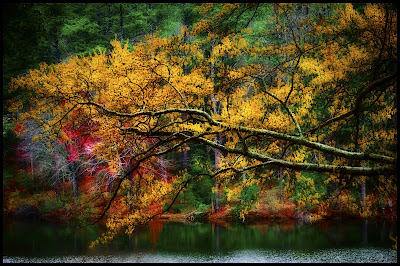
I came across this scene as soon as I arrived. The scene had great colors and the ambient light that was illuminating part of the lake and the far shoreline. I clicked-off a few shots and determined that I needed some light on the leaves. I attached my Nikon SU800 to my camera and placed a Nikon SB800 about ten (10) feet on both sides of my camera. I dialed in the fill flash that I wanted. It took me about six to eight clicks to get what I wanted.
It was not until I had all my gear packed away in my car that I thought about making the scene more abstract. I hurried back and tried to duplicate my shot, but the ambient light was not the same, so alas no abstract. I was forced to turn to Photoshop!
As I said in an earlier post, I like abstracts. I am not very good at them, but I want to get better. So, for 2009, I make a resolution to shoot and post at least one abstract every two weeks. I want the abstracts to be “in-camera” abstracts. Hopefully, I will do more, but that at least is my goal.
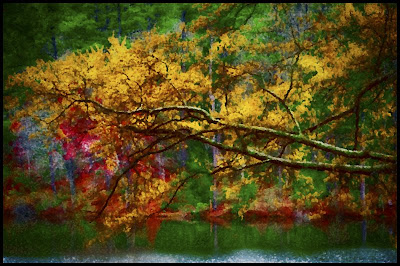
Today, I post two shots. The first is how it basically came out of the camera (and adjusted in Lightroom 2.0), and the second is my attempt to make it into an abstract through the magic of Photoshop filters. I wanted the abstract to be more a splash of colors rather than a sharp photo of leaves and a lake.
Camera settings: Nikon D3 with Nikon SU800 attached and on tripod, 105mm f/2.8 Macro, shot at ISO 200, f/11 and 1/180 of a second, two Nikon SB800 (1/32th power) on each side of the camera
Post Processing:
Lightroom— (for both photos) set white and black point, and added mid-tone contrast, increased color saturation of red, yellow, orange and green, changed hue of green (slightly).
Photoshop—(abstract image only) used Filter>Brush>Splatter at a radius of 10 and a smoothness of 5.
December 16, 2008
Abstracting Simple Scenes
My friend Steve has been doing a great job showing some simple subjects in an abstracted form (check him out here). I like this type of image. I am generally not very good at creating abstract. I think my left-brain (accountant/engineer type) takes over every time I pick-up my camera; and, since there is no “abstract” shooting mode on Nikons, I generally end up with photos that look like what was in front of my lens. I really have to work hard to get my abstract mode engaged.

With that said, a few weeks ago I was at Surf Side beach near Freeport, Texas. I was there to take a portrait of a surfer at sunrise. Before he got there, I started playing with blurring the waves and skyline by moving the camera from left to right as I held the shutter open. This is my favorite shot from my playtime. I had enough fun doing this that future playtime abstract sessions are on my schedule.
Camera settings: Nikon D3 (set to vivid color), 70-200mm f/2.8 at 200mm, shot at ISO 200, f/2.8 and 1/4 of a second on a tripod.
Post Processing: Lightroom—set white and black point, added mid-tone contrast and increased the saturation and luminosity to red, orange, blue and cyan.
